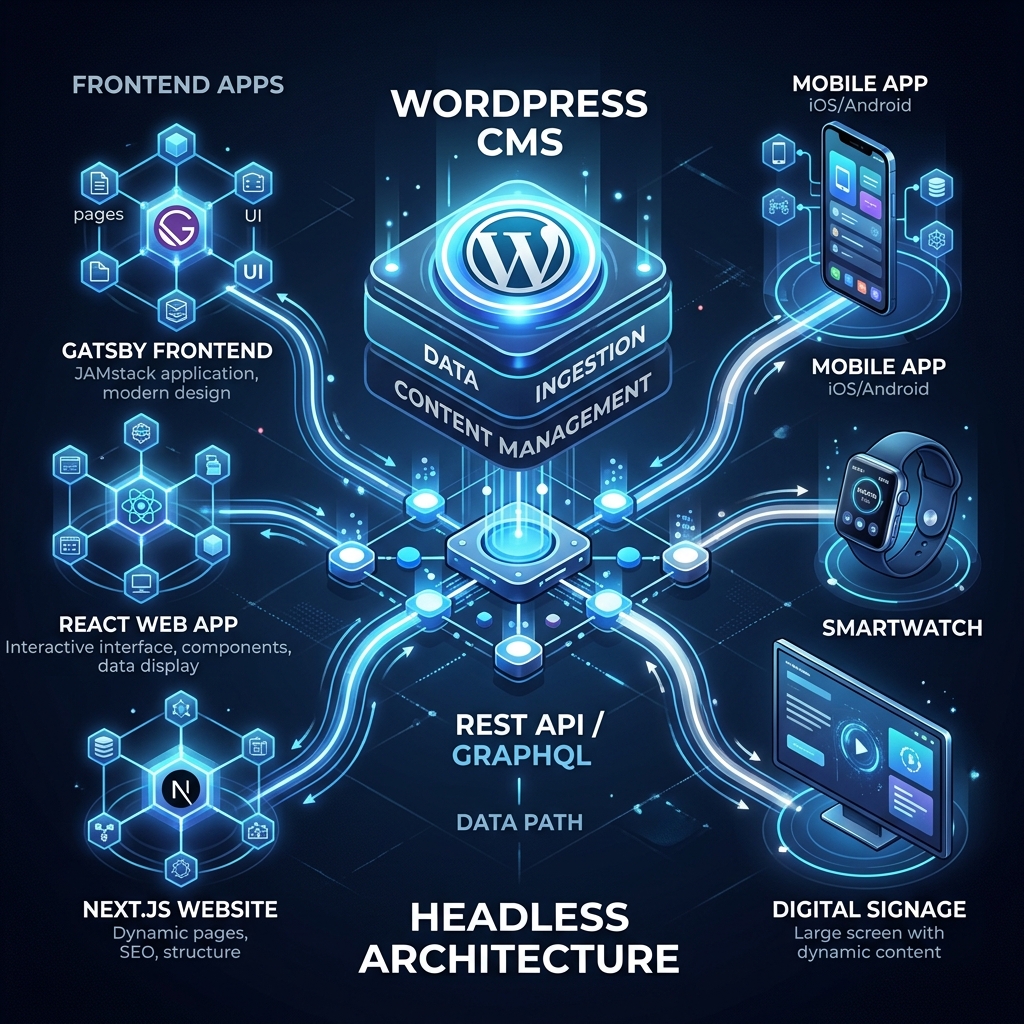
When discussing WordPress development in 2026, the conversation inevitably turns to Headless architecture. Traditional WordPress has powered the web for decades, but as performance and omnichannel delivery become critical SEO ranking factors, decoupled systems are taking center stage.
What is Headless WordPress?
In a traditional WordPress setup, the backend (where you write content) and the frontend (the theme visitors see) are tightly coupled. Headless WordPress separates them. You still use the familiar WordPress admin dashboard to manage content, but you use modern frontend frameworks like Next.js, React, or Vue to build the user interface, fetching data via the REST API or GraphQL.
Why the Shift? Performance and Core Web Vitals
The primary driver toward headless architectures is performance. Google's Core Web Vitals heavily penalize slow-loading sites. Traditional WordPress sites often struggle with:
- Heavy DOM sizes: Complex themes add unnecessary HTML.
- Render-blocking resources: Numerous plugins inject CSS and JavaScript that slow down the Largest Contentful Paint (LCP).
- Time to First Byte (TTFB): Server-side PHP rendering can be slow under heavy traffic.
With a Next.js frontend, pages can be statically generated (SSG) or incrementally regenerated (ISR). This means visitors are served pre-built HTML files from a CDN instantly, leading to near-perfect Lighthouse scores and significant SEO advantages.
Security Advantages
Security is a massive concern for CMS websites. Traditional WordPress exposes the database and login pages on the same server that serves the frontend. Headless architecture minimizes this attack surface. If your frontend is just static files communicating via an API, attackers cannot inject malicious PHP or exploit theme vulnerabilities. The backend can even be hidden behind a VPN or strictly IP-whitelisted.
The Omnichannel Future
Content is no longer confined to desktop and mobile browsers. Businesses need to push content to smartwatches, digital signage, mobile apps, and IoT devices. A headless CMS architecture makes WordPress a central content repository (a single source of truth) that can feed any frontend through its API.
When Should You Stick to Traditional WordPress?
Headless is not a silver bullet. You should avoid it if:
- You rely heavily on frontend plugins: Plugins like page builders (Elementor), SEO tools that inject meta tags directly, or complex form builders often break or require custom API bridges in a headless setup.
- Budget is tight: Headless development requires dual maintenance—you are managing a frontend codebase and a backend server.
- The site is purely a blog: For a simple blog with low traffic, the complexity of headless is overkill. A well-optimized traditional theme is sufficient.
Conclusion
For enterprise clients, high-traffic publishers, and brands prioritizing elite performance, Headless WordPress is the definitive path forward in 2026. It marries the world's most popular authoring experience with the speed and security of modern web development.
Discover the SEO and performance benefits of decoupling your WordPress backend from the frontend. Is Headless WordPress the right choice for your next web development project?
- Abdullah Sajid

Leave a comment